
Overview
footForma offers two complementary ways to add or modify build-up on a foot model:
-
Predetermined build-up zones, which are predefined, standard offset areas
-
The Sculpt Tool, which allows for free, manual adjustments
Both options are designed to support clinical intent while ensuring efficient and reproducible designs.
Offset Zones
The offset zones are standardized areas that apply a controlled offset to specific regions of the foot. These zones are intended for frequent and clinically common corrections, where consistency and predictability are important.
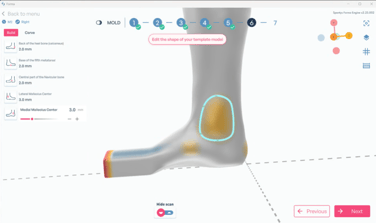
There are 5 predefined offset zones: Both malleoli, the back of the heel (Calcaneus), Navicular and the base of the 5th metatarsal.
When using build-up zones, the software applies a uniform modification based on predefined parameters. This ensures that the resulting design remains aligned with validated workflows and manufacturing constraints. Because these zones are standardized, they are especially useful when a repeatable outcome is required or when multiple devices are being produced following the same clinical logic.
In practice, build-up zones are used when:
-
The required correction follows a common clinical pattern
-
Consistency between cases is important
-
The modification does not require highly localized or irregular shaping
Sculpt Tool
The Sculpt Tool allows for manual, free-form adjustments directly on the 3D model. Unlike build-up zones, sculpting is not restricted to predefined areas or shapes. This gives the designer greater flexibility to respond to specific anatomical features or unique clinical requirements.
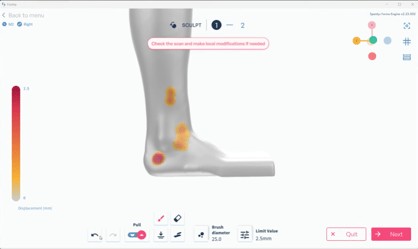
Sculpting is particularly useful when the desired modification cannot be achieved using standard build-up zones, or when fine-tuning is required. The tool enables gradual and localized adjustments, making it suitable for detailed refinements.
Common use cases for the Sculpt Tool include:
-
Addressing unique anatomical characteristics
-
Applying localized corrections that fall outside predefined zones
-
Fine-tuning an existing build-up to better match clinical intent
Best Practices
Predetermined build-up zones and the Sculpt Tool are not mutually exclusive. In many cases, the most effective workflow combines both approaches.
To ensure optimal results:
-
Apply build-up zones conservatively and review their impact on the overall geometry
-
Use the Sculpt Tool incrementally to avoid excessive or unintended changes
-
Regularly rotate and inspect the model from multiple angles while sculpting
By combining standardized build-up zones with targeted sculpting, footForma enables precise, clinically driven designs while maintaining efficient and reliable workflows.
To watch the corresponding video, click on this link.